
XM Ultra Low vs Exness Standard for Small Accounts: Commission, Spread and Cost per Lot
XM Ultra Low and Exness Standard both charge no commission, so spread decides the cost. See the table, the verified facts and a worked cost-per-lot example.
- Written by Blocktechpro Editorial Team
- Edited by Blocktechpro Editorial Team
- Fact-checked against verified broker disclosures,
XM Ultra Low and Exness Standard both charge no commission, so on a small account the cost difference comes down to the spread you actually get. XM's Standard and Ultra Low accounts are spread-only, and so is Exness Standard. There is no published like-for-like average spread for the two in our sources, so we cannot honestly name a winner. What we can do is lay out the verified facts, show the arithmetic, and give you a way to test both on your own symbols.
Disclosure: Blocktechpro is an affiliate of XM. When a reader opens an account through our link, XM pays Blocktechpro a commission and Blocktechpro keeps it. Blocktechpro does not pay rebates or cashback to traders.
Side-by-side: what is verified
| Item | XM Ultra Low | Exness Standard |
|---|---|---|
| Commission | None (spread only) | None |
| Published spread | Not published in our sources | From 0.2 pips |
| Third-party measured EUR/USD average | 1.1 pips (minimum 0.8) | Not available in our sources |
| Minimum deposit | $5 (all accounts except Shares) | No fixed minimum; depends on payment method and/or region |
| Maximum leverage | 30:1 at the EU entity, up to 1000:1 at XM Global | Not covered here; see our Exness account types guide |
| Platforms | MetaTrader 4, MetaTrader 5, XM App; no cTrader | Check Exness for current platforms |
Sources: ForexBrokers.com: XM review (commissions, deposit, leverage, platforms, measured spreads); Exness Standard accounts page (spread and commission); Exness Help Center: minimum amount needed to start trading (deposit).
Read the spread numbers carefully
- Exness's 0.2 pips is a from figure, the lowest the account page advertises. It is not an average, and it is not what you will pay on every trade.
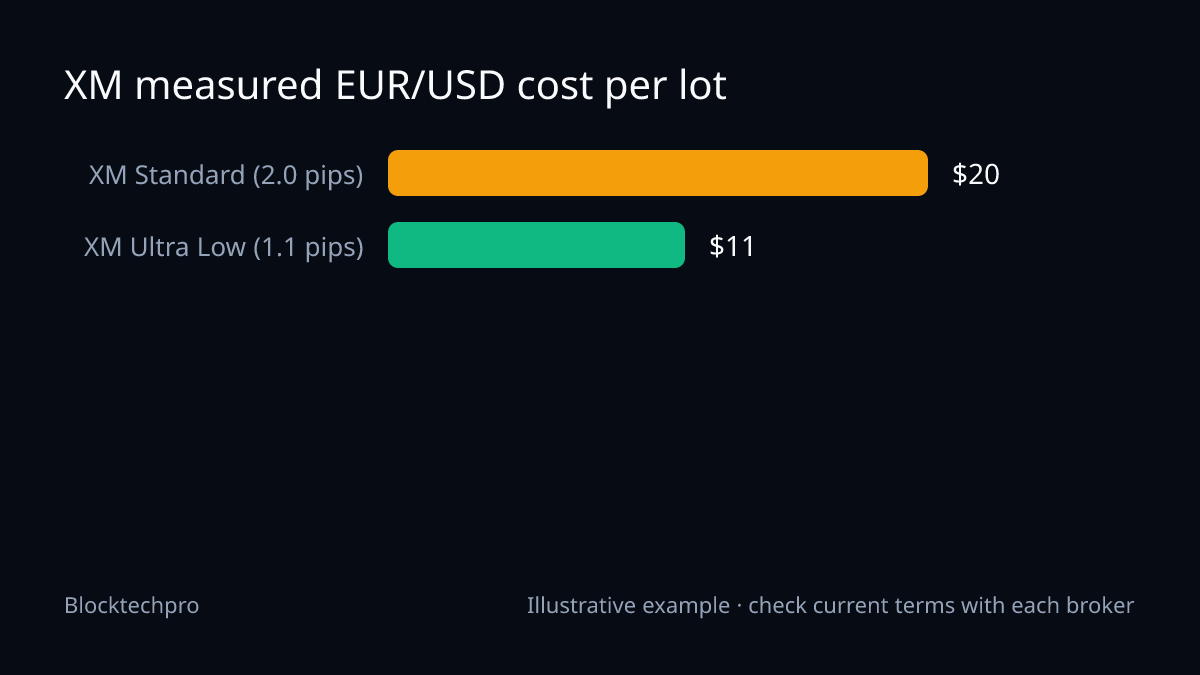
- XM's 1.1 pips is ForexBrokers.com's measured average for EUR/USD on Ultra Low, with a minimum of 0.8. It is a third party's measurement, not an XM quote. The same review measured 2.0 pips on the XM Standard account.
- Comparing Exness's best case with XM's average would be unfair to XM, so the main example below uses one hypothetical spread for both.
Worked example: same spread, both accounts
This is an illustration, not a quote. Assume a hypothetical EUR/USD spread of 1.0 pip on every account. One standard lot (100,000 units) is worth $10 per pip.
- Spread cost per lot: 1.0 pip x $10 = $10.00
- Commission on XM Ultra Low: $0.00. Commission on Exness Standard: $0.00
- Cost per lot on either: $10.00 + $0.00 = $10.00
Now scale it to small-account sizes. At 0.01 lot, the spread cost is 1.0 x $10 x 0.01 = $0.10 per trade. Twenty such trades cost 20 x $0.10 = $2.00, which is 1% of a $200 balance, whatever your results on those trades. On any commission-free account the cost grows only with the spread and the lot size.
For comparison, the commission-charging accounts on the same hypothetical spread:
- XM Zero: $3.50 per side per lot, so $7.00 round turn ($3.50 x 2). Cost per lot: $10.00 + $7.00 = $17.00.
- Exness Raw Spread: up to $3.50 each side per lot, so up to $7.00 round turn. Cost per lot: up to $10.00 + $7.00 = $17.00.
Sources: ForexBrokers.com: XM review and Exness Professional accounts page.
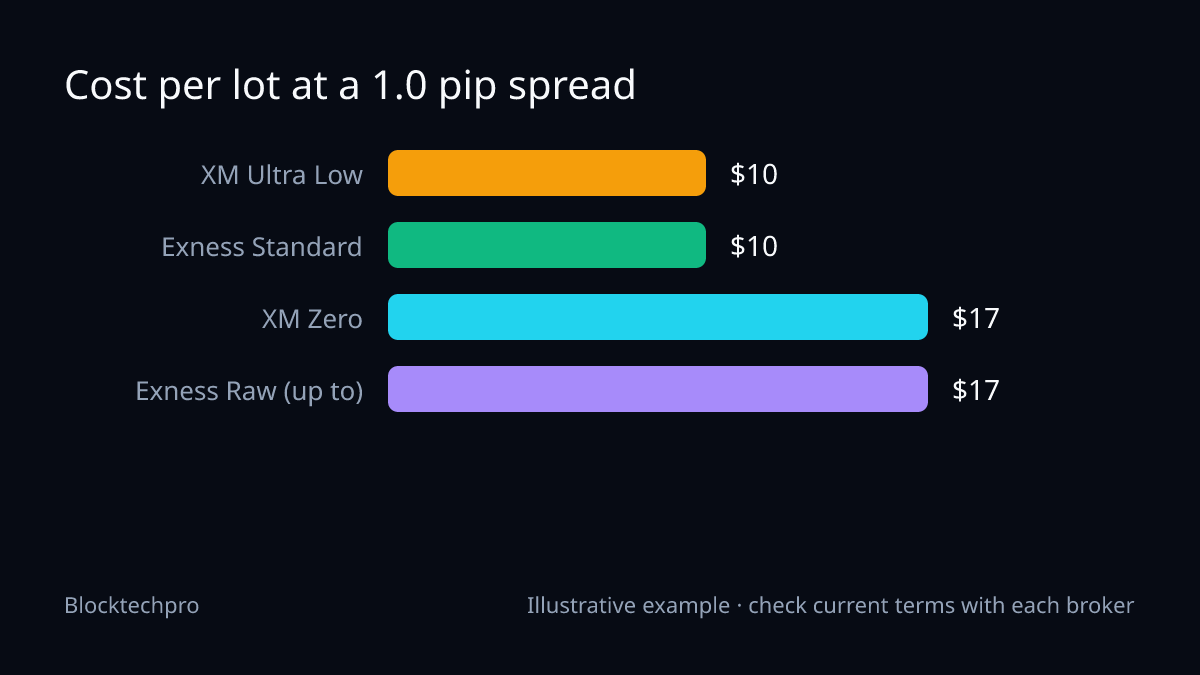
A raw account is not really 70% more expensive, because it normally quotes a tighter spread. The point is the break-even: $7.00 of commission is the same as 0.7 pip at $10 per pip ($7.00 / $10). A raw account only wins if its spread is more than 0.7 pip tighter than the commission-free account on the same pair and at the same time.
What XM's own two accounts cost
If you are choosing between XM's own accounts, the measured gap is large. At ForexBrokers.com's averages, one lot of EUR/USD costs 2.0 x $10 = $20.00 on Standard and 1.1 x $10 = $11.00 on Ultra Low. At 0.01 lot that is $0.20 versus $0.11 per trade. Source: ForexBrokers.com: XM review.
Gold on a small account
On XAU/USD, one lot is 100 oz, so a $0.10 move equals $10 per lot (some brokers count $0.01 as a pip, so check the contract specification). With a hypothetical gold spread of $0.30, the cost is 3 x $10 = $30.00 per lot, or $0.30 at 0.01 lot. Because gold spreads differ widely between brokers and sessions, test them directly rather than assuming the EUR/USD ranking carries over.
Small-account factors beyond spread
Deposit
XM lists a $5 minimum deposit on all accounts except Shares. Exness Standard has no fixed minimum, but the first deposit depends on your payment method and region. A low minimum is not a reason to trade size your balance cannot absorb: use the Lot Size Calculator to size each trade from your stop distance and risk percentage.
Raw accounts need more capital
Exness says its Professional accounts (Pro, Raw Spread, Zero) have a region-based minimum first deposit, with its Help Center citing at least 200 USD depending on regional requirements. For a very small balance, a spread-only account is the simpler option.
Regulation and availability
- XM Global Limited is regulated by the FSC of Belize (licence 8557558). The EEA entity is regulated by CySEC, and other entities by the DFSA, FSCA, FSA (Seychelles) and FSC (Mauritius). XM's ASIC licence is held through the separate Trading.com brand, not XM. Maximum leverage varies by entity, from 30:1 at the EU entity to as much as 1000:1 at XM Global. XM Global does not serve citizens of the United States, Canada, Israel and Iran, or other sanctioned countries.
- Exness entities on the global site include the FSA (Seychelles, Exness (SC) Ltd, licence SD025), FSCA, CBCS, FSC (BVI), FSC (Mauritius) and CMA (Kenya). The global site does not serve residents of the USA, Canada, Europe, the UK, Russia or Belarus.
Sources: XM regulation page and Exness website footer. Which entity you are served by depends on where you live, and that can change the protections and leverage you get.
Swaps
If you hold positions overnight, swaps apply. They vary by instrument, direction and broker, and are shown in the platform's contract specification. We do not quote swap rates here.
How to test the two accounts yourself
- Open a demo or the smallest live account on each, and add the pairs you trade to Market Watch.
- Record the spread in pips at the times you actually trade: London open, New York overlap, and rollover are very different.
- Compute cost per lot: spread in pips x pip value x lots, plus commission (zero on both of these accounts).
- Add your intended trade count per month and compare the totals.
- Check execution quality and withdrawal terms on each broker's official site, not just the quoted spread.
For more detail on each broker, see our XM review and Exness account types guide. If XM's Ultra Low account fits your test results, you can view XM's accounts through our partner link; as disclosed above, this pays Blocktechpro a commission, not you.
Verdict: what the evidence supports
Both accounts are commission-free, so neither adds a fee on top of the spread. XM Ultra Low has a third-party measured EUR/USD average of 1.1 pips; Exness Standard advertises spreads from 0.2 pips but has no comparable average in our sources. On that evidence, a clear winner cannot be declared. The cheaper account for you is the one with the lower spread on your pair at your trading hours, so measure it.
Risk warning
Leveraged forex and CFD trading can lose money quickly, and a low spread does not reduce that risk. Broker terms vary by country and change over time, so confirm fees, spreads, leverage and licences on each broker's official website. Rebates or commissions paid to anyone do not offset trading losses. Read our risk disclaimer before you trade.
Open an account or link your existing account
New to XM?
Compare the account costs, then open the one that fits
- Standard / Ultra Low: spread varies, no commission
- Zero: spread varies + $7.00 commission per lot round turn
Affiliate link: the broker pays us a commission. We do not pay rebates or cashback. Published figures; your spread varies with the market.
Already trading on Exness?
Link partner code ccm34k1you
If our free calculators help you, you can register under our partner code. Exness pays us from its own revenue; you get no rebate from us. Ask Exness support to confirm your account conditions before and after any partner change.
Topics
- XM Ultra Low
- Exness Standard
- small accounts
- spread-only accounts
- cost per lot
Related guides
All guides →
Exness Zero vs Vantage Raw ECN for Scalping: Published Commissions and Cost per Lot
Compare Exness Zero (and Raw Spread) with Vantage Raw ECN for scalping: published commissions, a cost-per-lot table and a worked example with stated inputs.
Exness Raw Spread vs IC Markets Raw Spread: Cost per Lot on EUR/USD and XAU/USD
Exness Raw Spread charges up to $7.00 per lot round turn and IC Markets Raw Spread (MetaTrader) charges $7.00. See the cost per lot maths on EUR/USD and gold.
Forex Cashback vs Rebate vs IB Commission: Same Money, Three Names
Cashback, rebate and IB commission usually describe the same broker-paid money at different points in the chain. See the differences and the per-lot arithmetic.