
XM Minimum Deposit: $5 on Most Accounts, $10,000 for Shares, and What Else to Check First
XM's minimum deposit is $5 on all accounts except the Shares account at $10,000. See account types, spreads, leverage and fees to check before depositing.
- Written by Blocktechpro Editorial Team
- Edited by Blocktechpro Editorial Team
- Fact-checked against verified broker disclosures,
The XM minimum deposit is $5 for all accounts except the Shares account, which requires $10,000. Source: ForexBrokers.com: XM review (updated 2026-09-04). Whether the figure applies to every payment method and country is not published on the pages we checked, so confirm the amount shown in your own XM client area before you fund.
Disclosure: Blocktechpro is an affiliate of XM. If you open an account through our link, XM pays Blocktechpro a commission, which Blocktechpro keeps. Blocktechpro does not pay rebates or cashback to traders.
XM broker minimum deposit by account type
| Account | Minimum deposit | Commission |
|---|---|---|
| Standard | $5 | None (spread only) |
| Ultra Low | $5 | None (spread only) |
| Zero | $5 | $3.50 per side per lot |
| Shares | $10,000 | Not published on the pages we checked |
Sources: minimum deposit and commissions from ForexBrokers.com: XM review. The $5 figure is stated for all accounts except Shares, so it covers Standard, Ultra Low and Zero as listed here.
XM account types
- Standard: no commission, you pay the spread only.
- Ultra Low: no commission, spread only.
- Zero: $3.50 per side per lot, which is $7.00 per lot round turn (our arithmetic: $3.50 x 2).
- Shares: the $10,000 minimum account.
Source: ForexBrokers.com: XM review. For a deeper look at the accounts, see our XM review, and for a small-account cost comparison see XM Ultra Low vs Exness Standard.
XM micro account and XM cent account
The pages we checked do not list a separate micro or cent account, and they do not publish a minimum lot size, lot unit or deposit figure for either. We therefore cannot say whether XM offers one. Check XM's account comparison page for current lot sizes before you deposit. What we can say: the minimum deposit is stated as $5 for all accounts except Shares.
You can still size a small trade yourself. At $10 per pip per standard lot on EUR/USD, a 0.01 lot is worth $0.10 per pip ($10 x 0.01). Use our Pip Calculator for other pairs.
XM spread
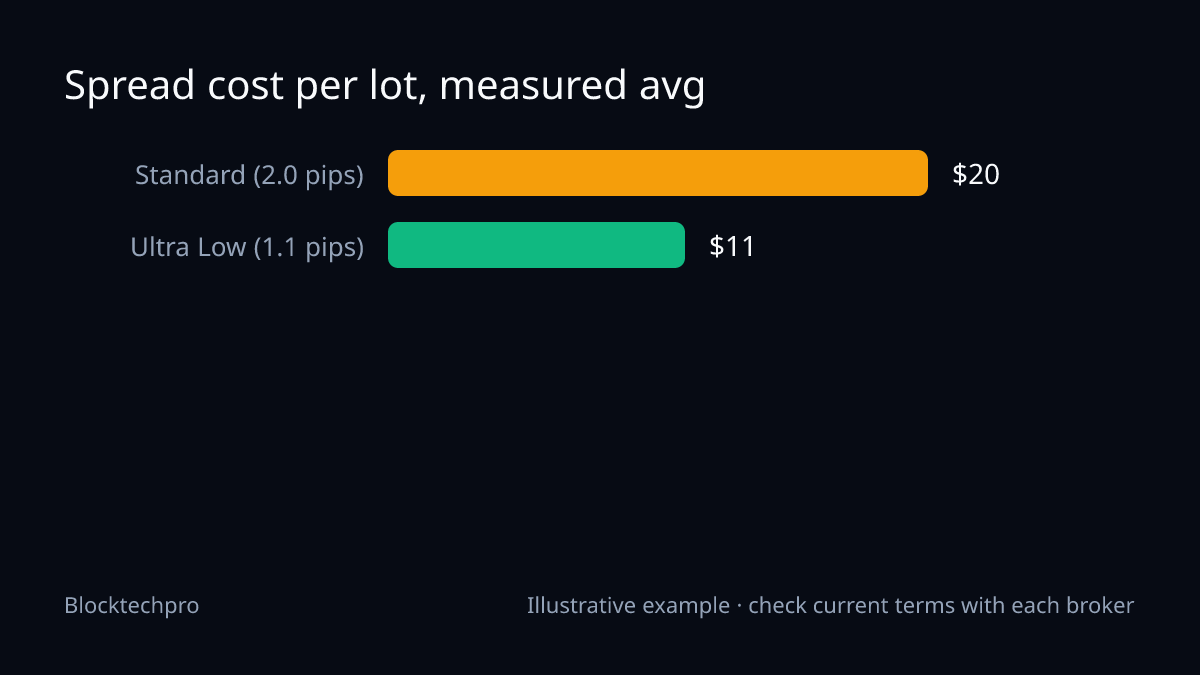
XM's own spread figures are not published on the pages we opened, so we do not quote any "from" spreads for Standard, Ultra Low or Zero. What exists is a third party's measurement: ForexBrokers.com measured average EUR/USD spreads of 2.0 pips on the Standard account and 1.1 pips on the Ultra Low account (minimum 0.8), both with no commission. These are averages from ForexBrokers.com: XM review, not XM quotes. A Zero account average is not given in the facts we checked.
Spread cost = spread in pips x pip value x lots. With EUR/USD at $10 per pip per lot, for 1 lot:
- Standard: 2.0 x $10 x 1 = $20
- Ultra Low: 1.1 x $10 x 1 = $11
Example: cost per lot with one hypothetical spread
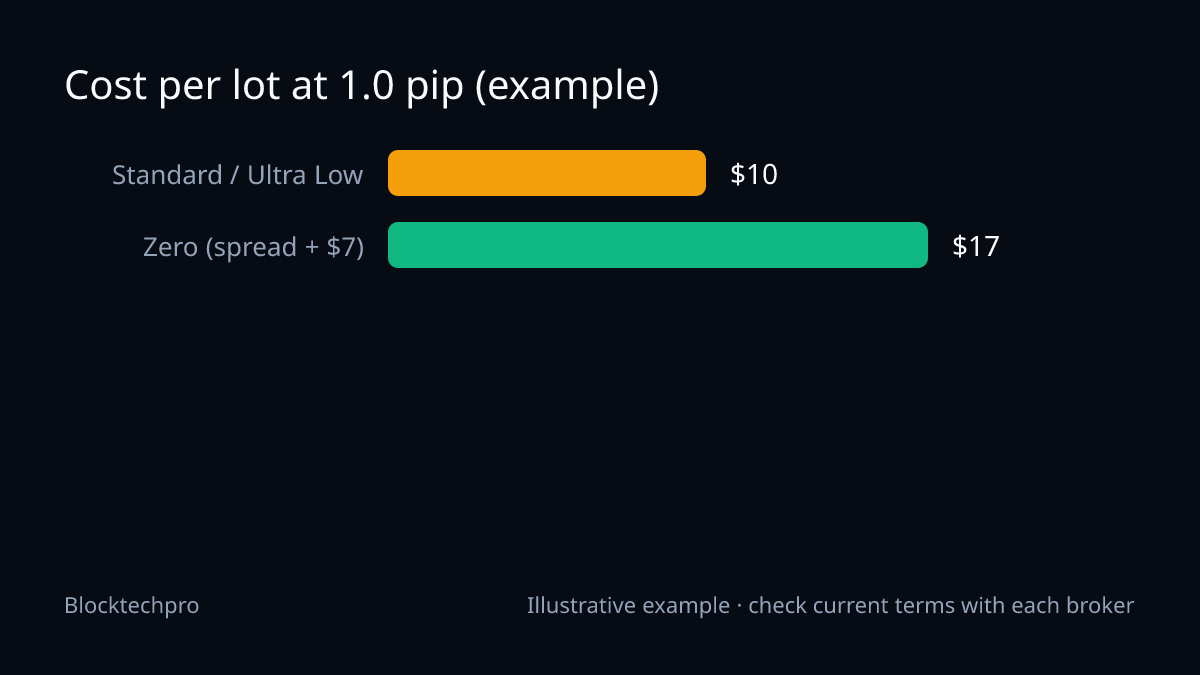
Suppose a hypothetical 1.0 pip spread on every account (an illustrative input, not an XM quote), 1 lot of EUR/USD:
- Standard or Ultra Low: 1.0 x $10 x 1 = $10 spread + $0 commission = $10
- Zero: $10 spread + ($3.50 x 2 = $7.00) commission = $17
Because the spread is the same in this example, it shows commission only. On a real account the spreads differ, so the cheaper account depends on the actual spread you see. Run your own numbers with the Lot Size Calculator.
XM leverage
Maximum leverage ranges from 30:1 at the EU entity to as much as 1000:1 at XM Global. Source: ForexBrokers.com: XM review. Which entity you are placed with depends on where you live. Leverage lowers the margin needed per trade but does not lower the loss on a given price move, so a tiny deposit with high leverage can be wiped out quickly.
XM fees
- Commission: none on Standard and Ultra Low; $3.50 per side per lot on Zero.
- Spread: see the section above; the spread is your main cost on the no-commission accounts.
- Swaps: these vary by instrument, direction and broker and are shown in the platform's contract specification. We do not state swap rates.
- Deposit, withdrawal and inactivity fees: not published on the pages we checked. Read XM's official fee page before you fund.
Platforms, regulation and who can open an account
XM offers MetaTrader 4, MetaTrader 5 and its own web and mobile platform (the XM App); there is no cTrader. Sources: ForexBrokers.com: XM review and XM regulation page.
XM Global Limited is regulated by the FSC of Belize (licence 8557558), and the EEA entity Trading Point of Financial Instruments Ltd is regulated by CySEC. The group's ASIC licence is held through the separate Trading.com brand, not XM. Source: XM regulation page.
XM Global does not provide its service to citizens of the United States, Canada, Israel and Iran, or other sanctioned countries (XM regulation page).
South Africa
Many searches for this topic come from South Africa. We have not yet confirmed XM's licence on the FSCA register, so we do not present XM as a locally licensed option there. Check the FSCA register yourself, and confirm which XM entity would hold your account, before depositing.
What to check before your first deposit
- Confirm the minimum shown for your region and payment method in XM's client area.
- Check which entity and leverage cap apply to you.
- Compare live spreads on the account you choose; our figures are third-party averages.
- Size trades with a stop-loss in mind, not the maximum leverage. Our Margin Calculator helps.
If you decide to open an account, you can do so through our XM link. Never share account numbers with anyone claiming to give you a rebate through Blocktechpro; we do not offer one.
FAQ
What is the XM minimum deposit?
$5 for all accounts except the Shares account, which requires $10,000.
Does XM have a cent account?
Not published on the pages we checked. Ask XM or check its account comparison page.
Does XM offer cTrader?
No. It offers MetaTrader 4, MetaTrader 5 and the XM App.
Is a $5 deposit enough to trade?
It meets the stated minimum, but a small balance leaves little room for a stop-loss or spread costs. Work out the position size first.
Risk warning
Leveraged forex and CFD trading can lose money quickly, and rebates or low minimum deposits do not offset trading losses. Terms change and vary by country, so confirm them on XM's official website. Read our risk disclaimer.
Open an account or link your existing account
New to XM?
Compare the account costs, then open the one that fits
- Standard / Ultra Low: spread varies, no commission
- Zero: spread varies + $7.00 commission per lot round turn
Affiliate link: the broker pays us a commission. We do not pay rebates or cashback. Published figures; your spread varies with the market.
Already trading on Exness?
Link partner code ccm34k1you
If our free calculators help you, you can register under our partner code. Exness pays us from its own revenue; you get no rebate from us. Ask Exness support to confirm your account conditions before and after any partner change.
Topics
- XM
- minimum deposit
- account types
- spreads
- leverage
Related guides
All guides →
Low Spread Forex Broker: Cost per Lot on Raw, Zero, Standard and Cent Accounts
Which accounts give the lowest cost per lot? Published spreads and commissions for Exness, XM, Vantage, IC Markets and Markets4you, with the arithmetic shown.
XM Ultra Low vs Exness Standard for Small Accounts: Commission, Spread and Cost per Lot
XM Ultra Low and Exness Standard both charge no commission, so spread decides the cost. See the table, the verified facts and a worked cost-per-lot example.
Exness Zero vs Vantage Raw ECN for Scalping: Published Commissions and Cost per Lot
Compare Exness Zero (and Raw Spread) with Vantage Raw ECN for scalping: published commissions, a cost-per-lot table and a worked example with stated inputs.